


Thinking of purchasing a web hosting service and came across Kinsta? Wondering if it’s the right choice for your blogging needs? You’re in the perfect spot, we’ve got all the details covered for you.
Kinsta became operational in 2013 when four friends came together. Since then, it has become a leader in web hosting. It now serves over 128 countries and supports more than 1,20,000 customers. This includes Fortune 500 companies, e-commerce sites, and bloggers. Kinsta offers great speed, strong security, and efficient databases. These features make it a top choice for bloggers.
This Kinsta review is your guide to its plans, pricing, and features. We will evaluate its performance and security. This will help you decide if it’s the right choice for you.
Table of Contents
Kinsta at Glance
| Rating: | ★★★★★ |
| Starting Price: | $30/month |
| Uptime: | 99.99% |
| Server Locations: | Asia, Europe, Australia, and the United States. |
| Recommended Plan: | Single 35k Annual (start “FREE”) |
| Security: | Wildcard SSL, DDoS, Firewall, SOC2 Compliant |

Kinsta offers 3 major types of hosting plans: Single-site Plan, Multi-site Plan, Agency Plan
It offers reliable web hosting with impressive performance. It boasts an uptime of 99.99%, meaning websites are always available. The average response time is 210 ms. This shows good performance for most of the sites.
Pros &
Cons
- Free website migration
- Larger global presence (37 data centers)
- Best in class performance
- Guaranteed uptime
- Backup retention
- Higher CDN storage
- Higher prices
- Supports only WordPress as a CMS
Kinsta Web Hosting: Plans & Pricing in Detail
When it comes to selecting a web hosting plan, user needs can vary significantly. Some people care most about saving money. Others want the highest security, no matter the cost. For truly efficient hosting, it’s essential to consider multiple factors. Some of the important parameters are performance, reliability, customer support, and service quality.
If you’re here looking for web hosting services provided by Kinsta, you’ve come to the right place. We’ve got everything you need.
Our Kinsta review gives a clear view of the hosting plans, key features, and pricing. This guide also compares the features of each plan and includes a pricing table.
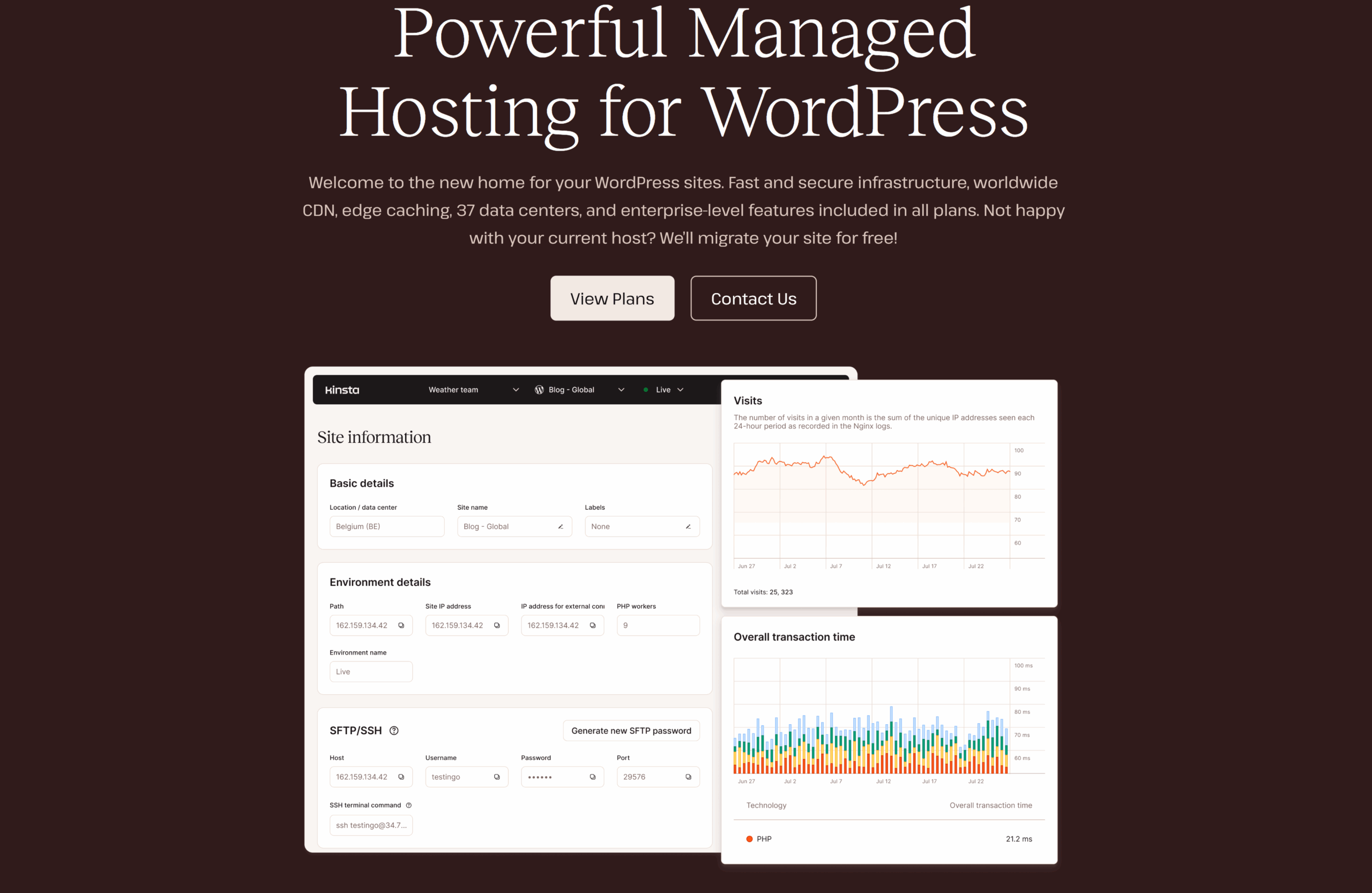
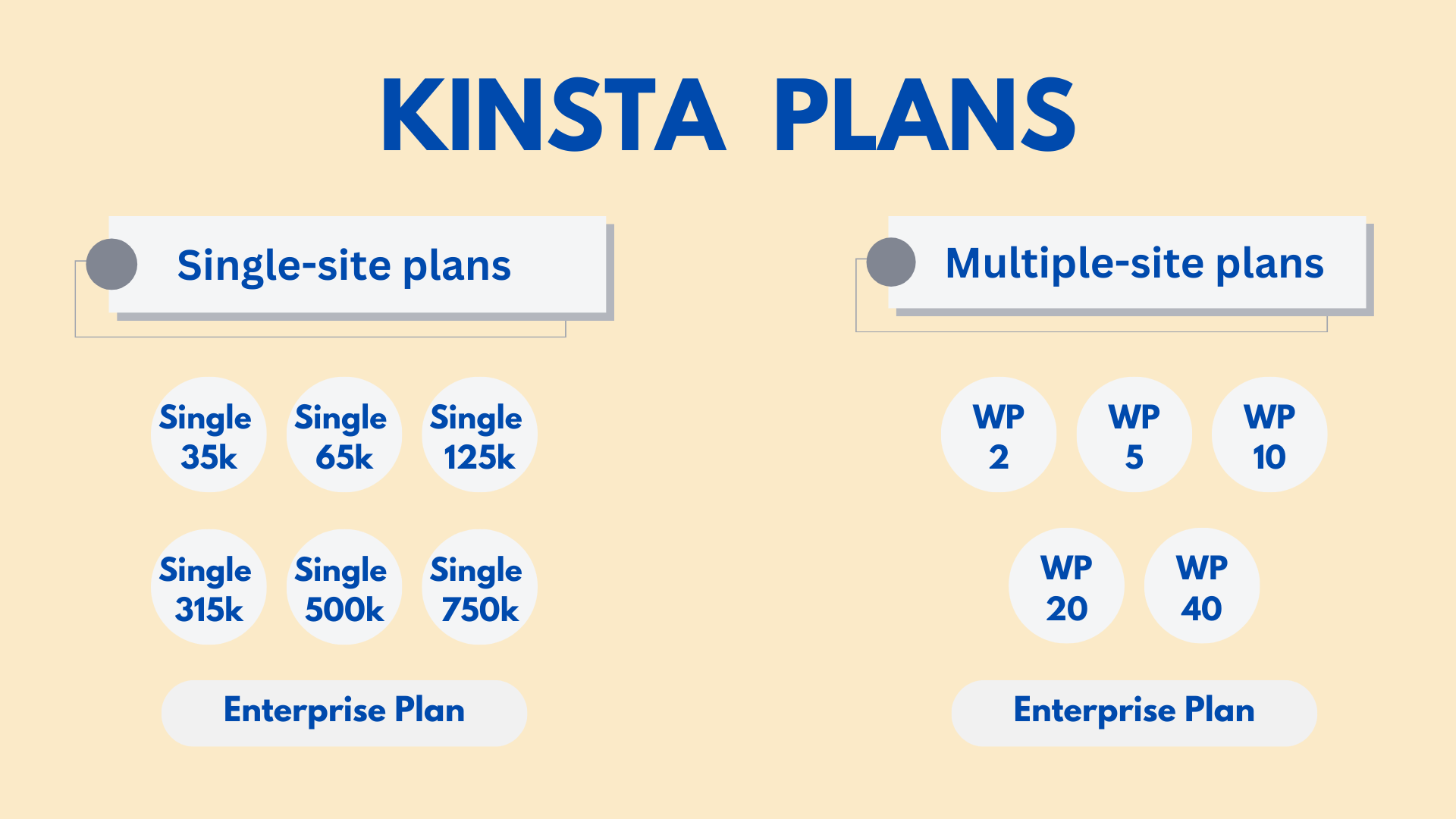
Kinsta offers managed WordPress hosting with three main options:
- Single-site plans
- Multi-site plans
- Kinsta Agency Program
Kinsta offers flexible payment options. Users can choose between monthly and annual plans. If you pick the annual plan, you can save a lot compared to paying monthly.
Kinsta Single-Site Plan
Kinsta’s single-site plan is perfect for sites with lower needs. It suits bloggers and small businesses that get low to moderate traffic. All Kinsta plans are known for their fast speed. However, the single-site plans shine with their scalability. This makes it easy for users to upgrade traffic capacity, storage, CDN, and more as their needs grow.
Kinsta offers seven plans in its Single-Site category: 35k, 65k, 125k, 315k, 500k, 750k, and the Enterprise Plan. In this Kinsta review, we will focus on the six plans, leaving out the Enterprise Plan for clarity.
Single 35k
- Renews at $360 (12/mo term)
- Monthly Renewals at $35/mo
Single 65k
- Renews at $500 (12/mo term)
- Monthly Renewals at $50/mo
Single 125k
- Renews at $900 (12/mo term)
- Monthly Renewals at $90/mo
Single 315k
- Renews at $1700 (12/mo term)
- Monthly Renewals at $170/mo
Single 500k
- Renews at $2900 (12/mo term)
- Monthly Renewals at $290/mo
Single 750k
- Renews at $3750 (12/mo term)
- Monthly Renewals at $375/mo
We’ve made a feature comparison table. It will help you pick the best Kinsta plan for you.
| Features | Single 35k | Single 65k | Single 125k | Single 315k | Single 500k | Single 750k |
|---|---|---|---|---|---|---|
| Free Domain | No | No | No | No | No | No |
| Free SSL | Yes | Yes | Yes | Yes | Yes | Yes |
| Websites | 1 | 1 | 1 | 1 | 1 | 1 |
| Traffic (visits/month) | 35 k | 65 k | 125 k | 315 k | 500 k | 750 k |
| Storage | 10 GB | 10 GB | 10 GB | 10 GB | 15 GB | 15 GB |
| Free CDN | 125 GB | 250 GB | 500 GB | 750 GB | 1000 GB | 1500 GB |
| WordPress Installs | 1 | 1 | 1 | 1 | 1 | 1 |
| Guaranteed Uptime | 99.9% | 99.9% | 99.9% | 99.9% | 99.9% | 99.9% |
| Free Migration | Yes | Yes | Yes | Yes | Yes | Yes |
| Backup Retention | 14 days | 14 days | 14 days | 14 days | 14 days | 14 days |
If you’re a beginner, the Single 35k plan is your best choice. Other plans are for higher requirements. If you have a small website and want a great blogging solution, the Single 35k plan fits perfectly. The best part? It’s free for the first month! Yes, that’s right. You can start your journey at no cost. No other plan offers this feature.
Kinsta Multi-Site Plan
Kinsta Multi-Site plan improves the single-site plan. It is perfect for users with multiple websites. This plan solves the challenges of managing several sites on one host. For example, it offers more traffic capacity, extra WordPress installs, larger storage, and greater CDN bandwidth. It also includes advanced features for better hosting.
This plan makes it easy to host and grow many sites. It provides scalability, reliability, and strong support. So, it is a great choice for anyone looking for a premium solution to manage multiple websites.
WP 2
- Renews at $700 (12/mo term)
- Monthly Renewals at $70/mo
WP 5
- Renews at $1150 (12/mo term)
- Monthly Renewals at $115/mo
WP 10
- Renews at $2250 (12/mo term)
- Monthly Renewals at $225/mo
WP 20
- Renews at $3400 (/12mo term)
- Monthly Renewals at $340/mo
WP 40
- Renews at $4500 (/12mo term)
- Monthly Renewals at $450/mo
Enterprise
- Renews at $6750 (/12mo term)
- Monthly Renewals at $675/mo
Now lets compare the features for these Multi-site hosting plans:
| Features | WP 2 | WP 5 | WP 10 | WP 20 | WP 40 | Enterprise |
|---|---|---|---|---|---|---|
| Free Domain | No | No | No | No | No | No |
| Free SSL | Yes | Yes | Yes | Yes | Yes | Yes |
| Websites | 2 | 5 | 10 | 20 | 40 | 60+ |
| Traffic (visits/month) | 70 k | 125 k | 315 k | 500 k | 750 k | 1250 k |
| Storage | 20 GB | 30 GB | 40 GB | 50 GB | 60 GB | 100 GB+ |
| Free CDN | 250 GB | 500 GB | 750 GB | 1000 GB | 1500 GB | 2500 GB+ |
| WordPress Installs | 2 | 5 | 10 | 20 | 40 | 60+ |
| Account Managers | No | No | Yes | Yes | Yes | Yes |
| Free Migration | Yes | Yes | Yes | Yes | Yes | Yes |
| Backup Retention | 14 days | 14 days | 14 days | 20 days | 20 days | 30 days |
Kinsta Multi-Site plan suits experienced users, not beginners. It’s ideal for high-traffic businesses like large enterprises and e-commerce sites. If you manage multiple blogs, consider the WP 2 plan. It costs $59 per month and includes 20 GB of storage, 250 GB of CDN bandwidth, and a 14-day backup retention.
This plan is budget-friendly for smaller projects while ensuring good performance and reliability.
Kinsta Agency Plan
The Kinsta Agency plan is made for agencies and big organizations. It helps them manage several client websites. It is one of the more expensive hosting options, but it excels in reliability, scalability, and performance. Kinsta offers three Agency plans: Agency 20, Agency 40, and Agency 60. Each plan meets different website management needs.
Let’s look at the features of each plan and compare them to find the best fit for your audience.
Agency 20
- Renews at $3400 (12/mo term)
- Monthly Renewals at $340/mo
Agency 40
- Renews at $4500 (12/mo term)
- Monthly Renewals at $450/mo
Agency 60
- Renews at $6750 (12/mo term)
- Monthly Renewals at $675/mo
The Kinsta Agency plan, unlike the Single-Site and Multi-Site plans, does not offer a one-month free trial. It instead focuses on premium features for agencies that manage multiple client websites.
| Features | Agency 20 | Agency 40 | Agency 60 |
|---|---|---|---|
| Free Domain | Yes | Yes | Yes |
| Free SSL | Yes | Yes | Yes |
| Websites | 20 | 40 | 60 |
| Traffic (visits/month) | 500 k | 750 k | 1250 k |
| Storage | 50 GB | 100 GB | 150 GB |
| Free CDN | 1000 GB | 1500 GB | 2500 GB |
| WordPress Installs | 20 | 40 | 60 |
| Free Migration | Yes | Yes | Yes |
The Kinsta Agency Plan offers a range of solutions for different agency needs:
- Agency 20: Great for smaller agencies with up to 20 WordPress installs. It balances cost and essential features.
- Agency 40: Ideal for growing agencies, this plan supports up to 40 WordPress installs. It’s a versatile choice for expanding client lists.
- Agency 60: Made for large agencies, it allows up to 60 WordPress installs. This plan is tailored for managing big portfolios easily.
All tiers provide scalable storage and plenty of CDN bandwidth. They deliver the reliability and flexibility agencies of all sizes need.
Kinsta Plan Comparison
In our Kinsta review, we looked at three main types of hosting plans:
Single-Site Plan: This plan suits beginners or users with basic needs. It’s perfect for small websites with low traffic. An ideal choice for those just starting out.
Multi-Site Plan: This is a step up from the Single-Site Plan. It’s made for users with several websites. It offers more scalability, making it great for e-commerce sites or growing businesses.
Agency Plan: This plan is for professionals and organizations. It’s designed for agencies managing many websites. It has strong features for heavy traffic and complex needs. It’s not for beginners but great for those with demanding requirements.
For those looking to get started quickly, the Single-Site Plan is an excellent choice. It’s user-friendly and perfect for beginners aiming to establish their online presence.
Kinsta's Single-Site Plan is highly recommended for bloggers. Click here to start free as a website owner.
Does Kinsta Provide Reliable Web Hosting?
Kinsta is known for its reliability in web hosting. It has become a top choice for many users due to its strong features. Kinsta claims to excel in speed, uptime, security, and customer support. But does it really deliver? In this Kinsta review, we’ll explore Kinsta’s reliability to see if it meets your blogging needs.
Kinsta Performance: Uptime and Response Time
When managing a website, keep an eye on important metrics. These include Uptime, loading speed, and Response time. These factors ensure a smooth experience for visitors and directly affect user satisfaction. Also, performance is vital for SEO rankings.
Now, let’s explore Kinsta’s performance and see how it measures up.
To evaluate Kinsta’s performance comprehensively, I have adopted a three-time-frame approach: short-term, mid-term, and long-term.

Uptime
Uptime is the time your website or hosting service is online and working. It shows how reliable your site is, letting visitors access it without interruption.
In this Kinsta review we have examined 3 time frames to measure uptime%
- Short-Term: Monitored for 90 days
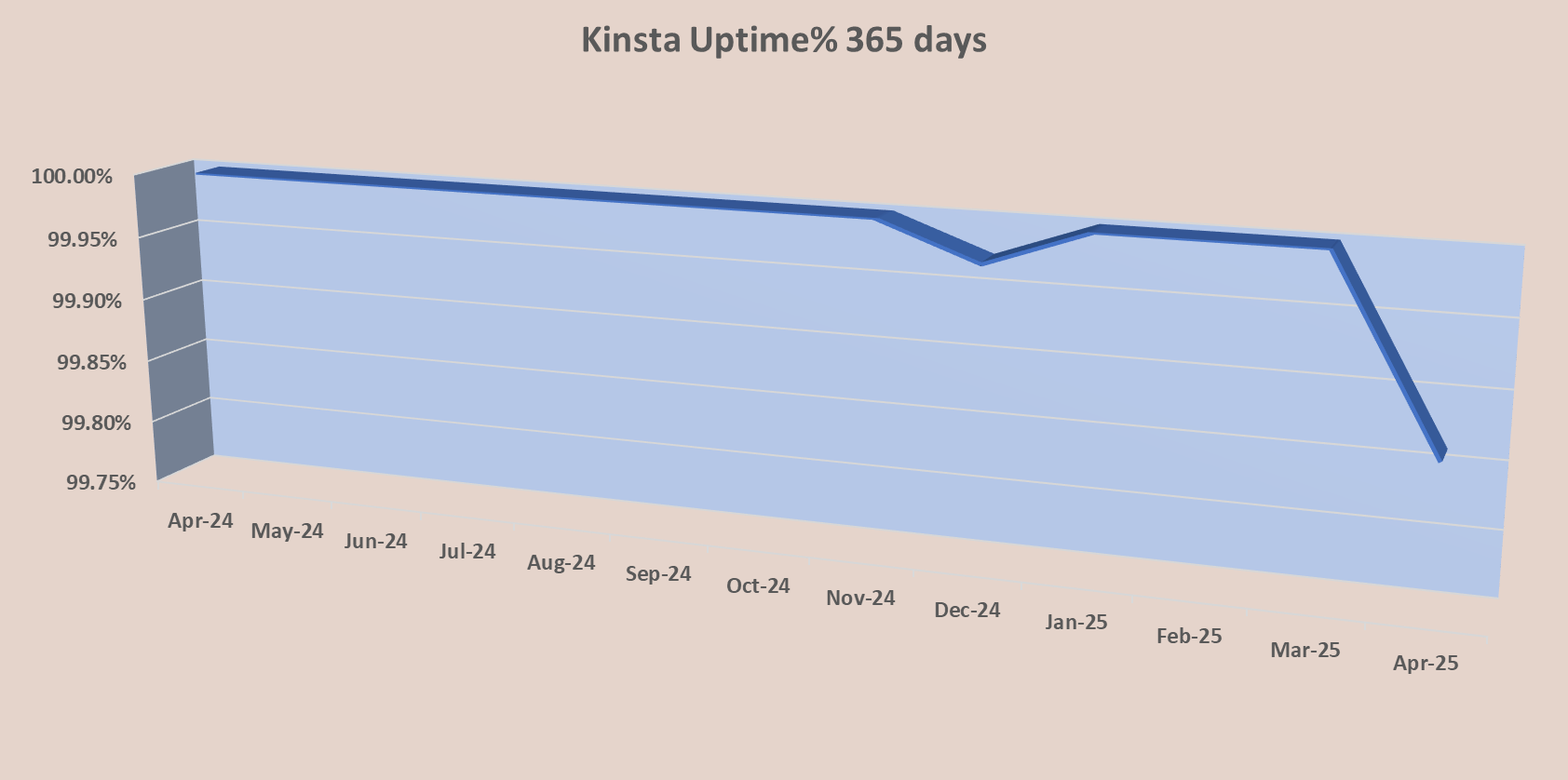
- Mid-Term: Monitored for 365 days
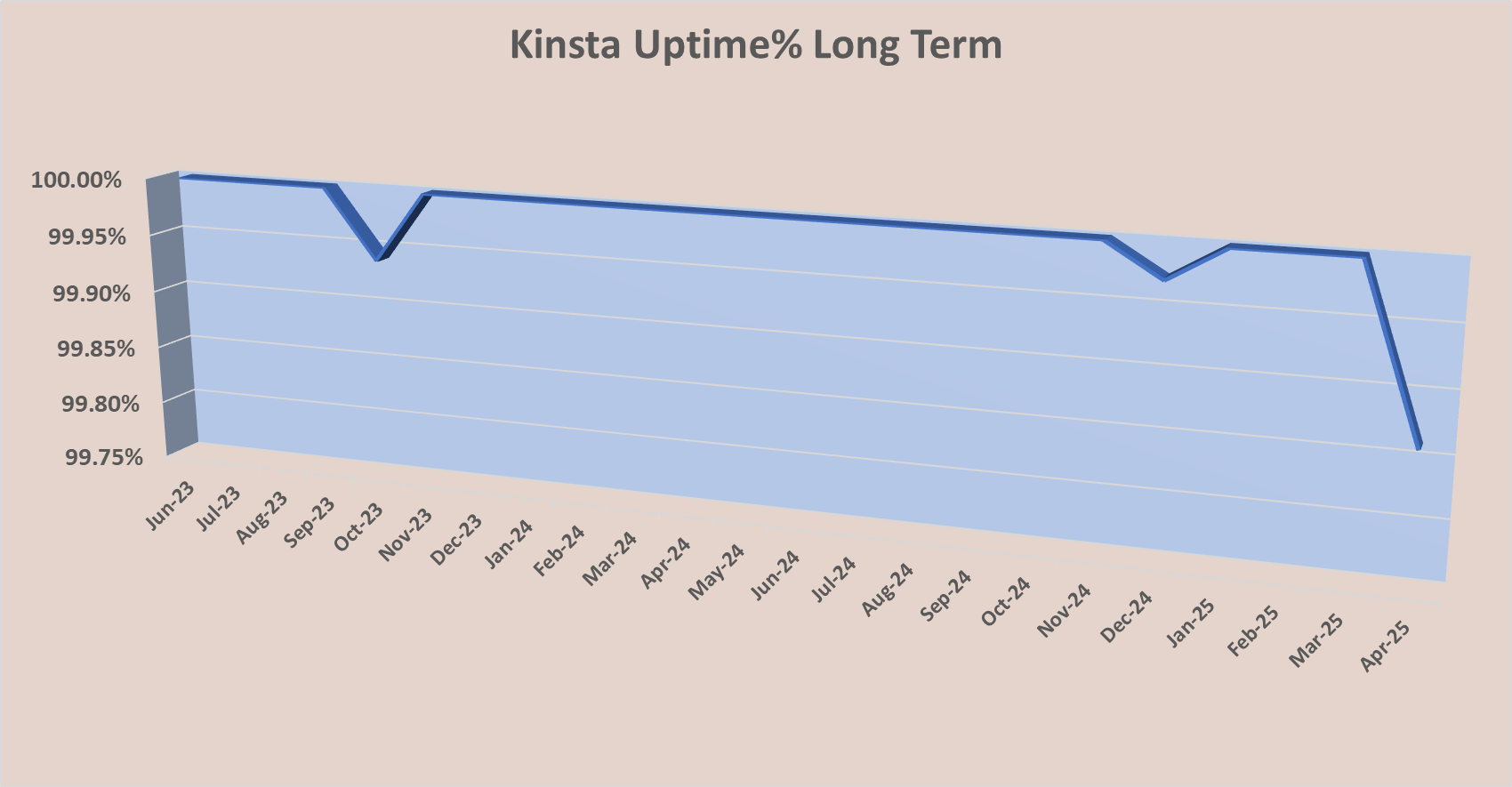
- Long-Term: Monitored for 24 months
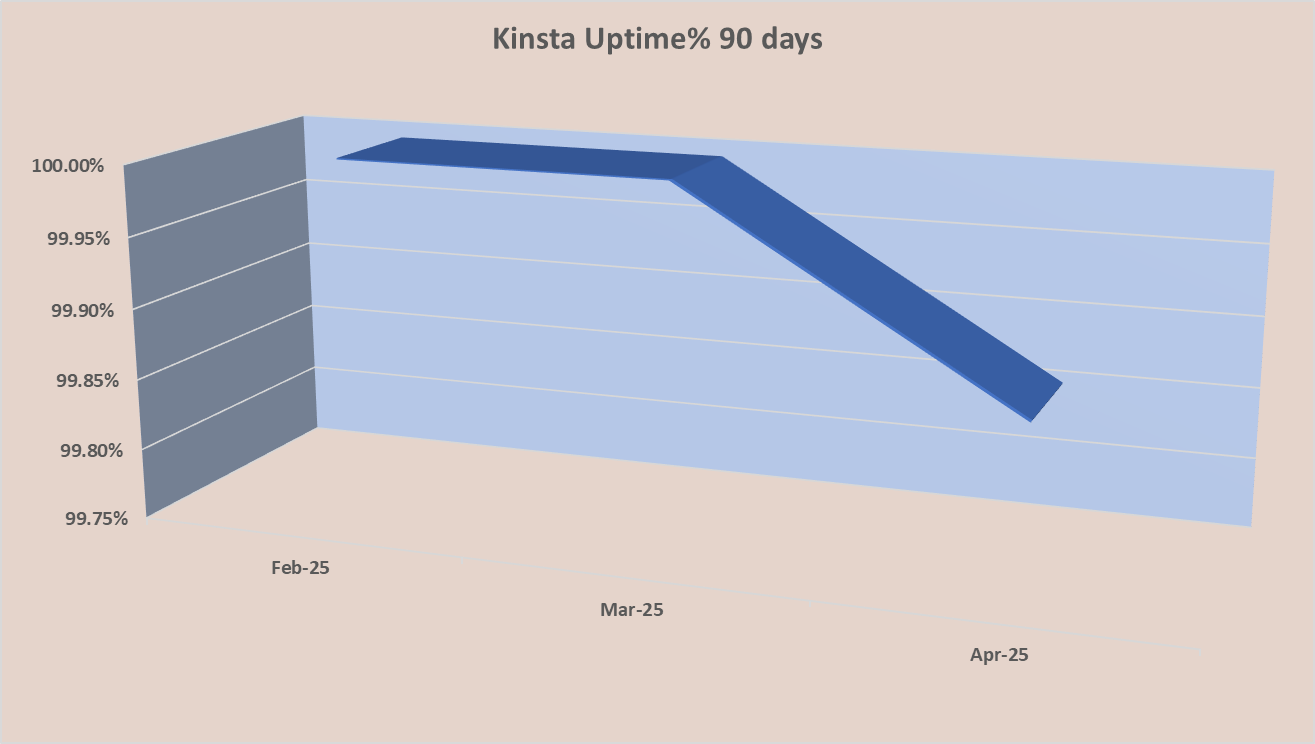
Firstly, we analyzed uptime% from February to April 2025. During this period, Kinsta showed an impressive uptime of 99.95%.
Secondly, I analyzed a 365 days period and got uptime of 99.99%.
Lastly, for the long-term analysis, we assessed a 24-month period. During this time, Kinsta achieved an uptime of over 99.998%.
Response time
Response time is how fast a server starts sending content after it gets a request. It’s measured in milliseconds (ms). Lower response times mean quicker access to website data.
In our Kinsta review, we tracked the web hosting provider’s response time for 90 days. We found a minimum response time of 141 ms and a maximum of 448 ms. On average, Kinsta’s response time was 210.69 ms. This places it among the best in the market.
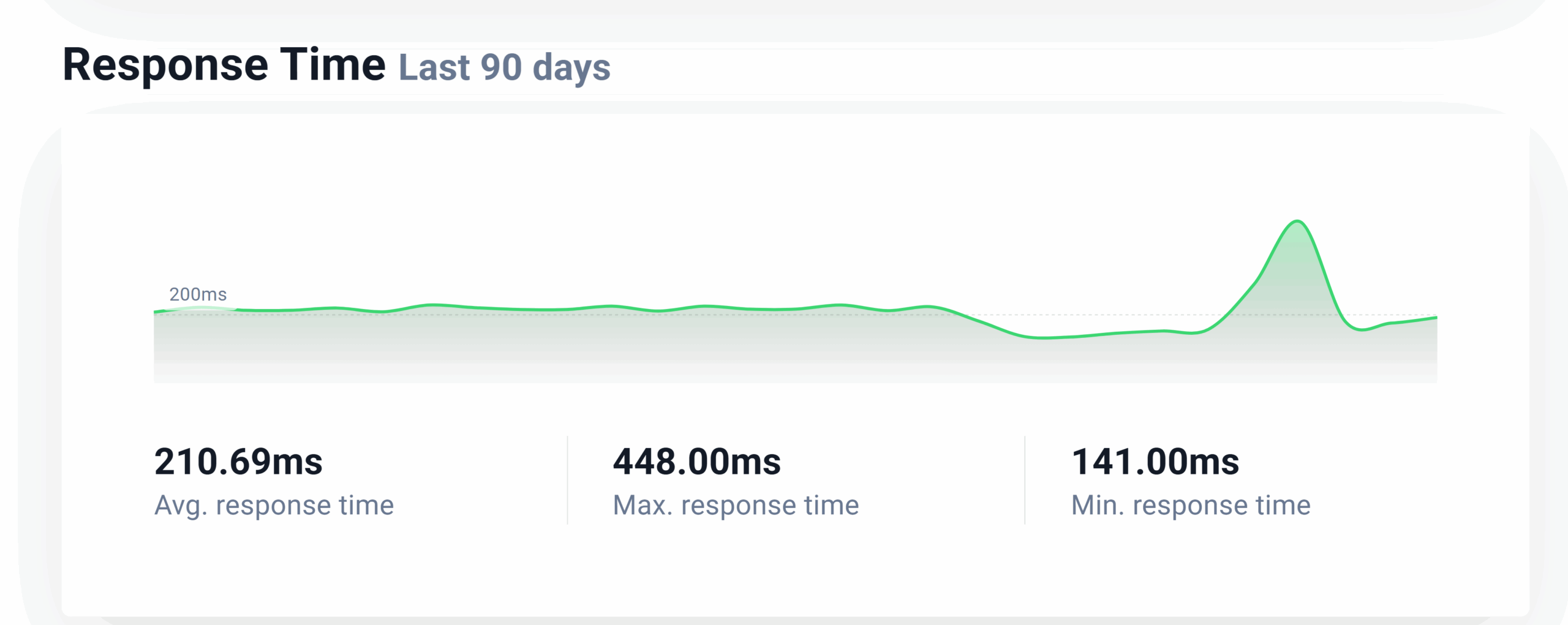
Quick Verdict: Kinsta provides excellent performance. It boasts 99.99% uptime and a response time of 210.69 ms on average. Whether you’re blogging or managing any website, Kinsta provides reliability and speed.
Is Kinsta secure?
Security is key for any website. It protects against breaches, hacks, and keeps users’ data safe. In this Kinsta review, we’ll explore the security features Kinsta provides. We will also see how well they protect your website and its visitors.
Kinsta offers solid security features to keep your WordPress site and data safe. Here’s a look at what it offers:
- Wildcard SSL Certificates: Every plan comes with free Wildcard SSL certificates. These secure connections protect data shared between your site and visitors.
- Firewall and DDoS Protection: Kinsta relies on Cloudflare’s tech for strong server-level firewall and DDoS protection. This helps keep out malicious traffic.
- Malware Scanning and Free Removal: Regular malware scans are part of the service. If malware is found, Kinsta offers free removal to restore your site without extra costs.
- Multiple Backup Options: Kinsta provides automatic daily backups, manual backups, and downloadable backups. This keeps your data secure and easy to recover.
Kinsta is also SOC 2 compliant, showing its commitment to high-level security. Features like isolated software containers ensure complete site privacy. This helps you stay ahead of threats. Plus, secure remote access via SSH or SFTP adds another layer of protection.
Quick Verdict: Kinsta offers strong security measures. This makes it a great choice for anyone who wants peace of mind for their WordPress site.
How good is Kinsta’s Customer Support?
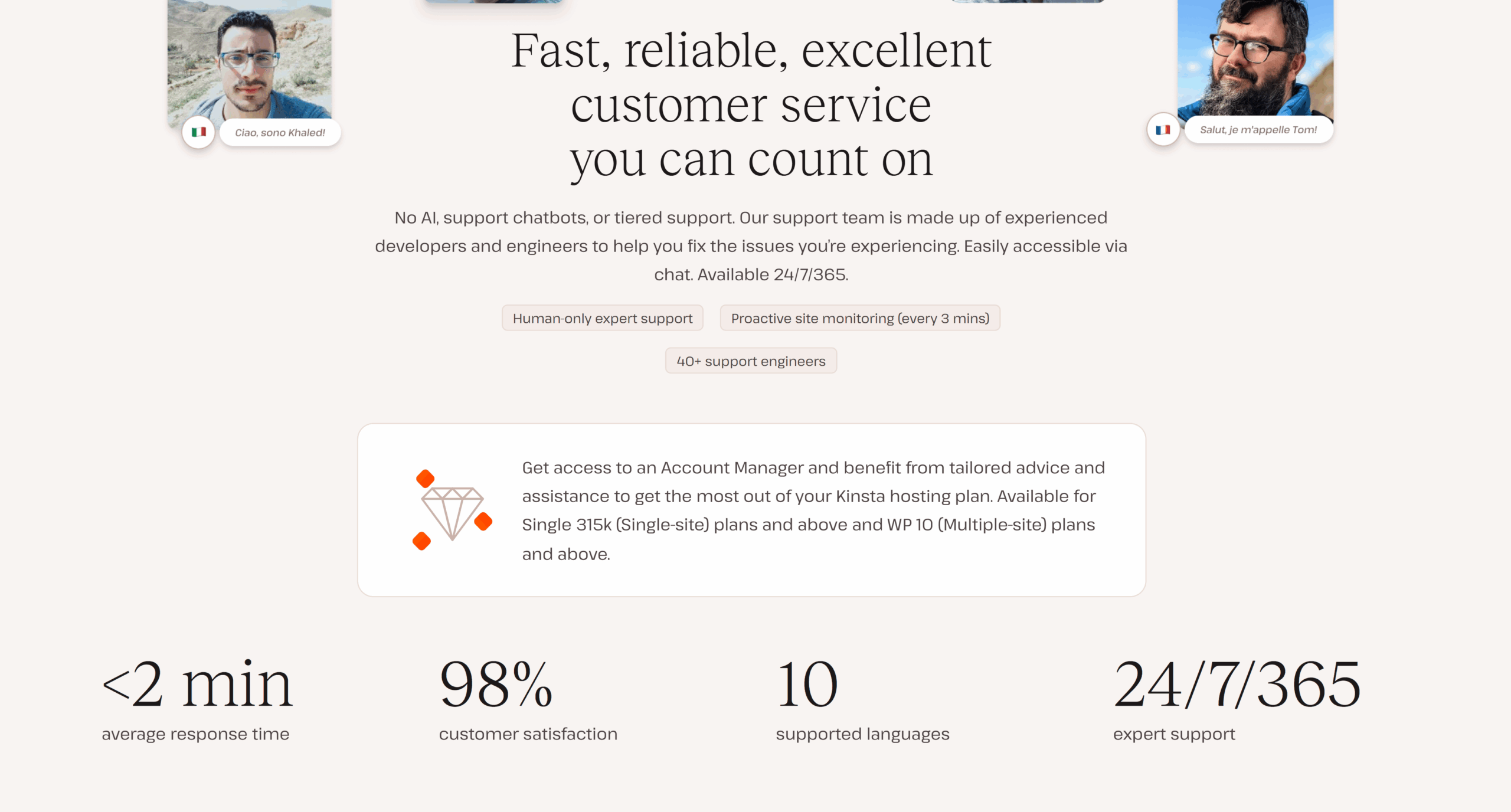
Kinsta offers 24/7/365 expert support. This means help is available anytime, anywhere. Users can count on professional guidance to fix issues quickly. But how effective is this support?
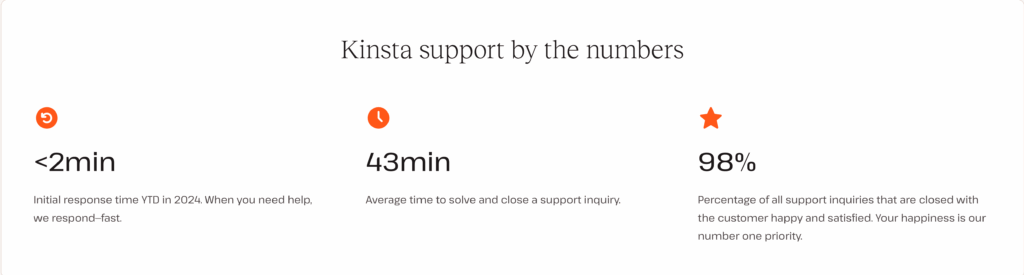
Kinsta’s customer support responds in under 120 seconds. This means you won’t wait long for help. They also resolve queries in an average of 43 minutes. With a 98% success rate, Kinsta shows reliability and efficiency. Their support service is truly a standout feature.
Quick Verdict: You can truly rely on Kinsta for resolving your issues. The customer support team is rapid and efficient.
So, Does Kinsta Provide Reliable Web Hosting? Yes, Kinsta is reliable. To sum up, it combines performance, security, and support well. With 99.99% uptime and an average response time of 210.69 ms, your website remains fast and accessible. Kinsta provides solid security features including DDoS protection and malware removal. Also, its 24/7 expert support is quick and effective, resolving issues with a 98% success rate.
How to setup a hosting plan using Kinsta?
You’ve checked out Kinsta’s hosting plans and looked at its performance, security, and support. Now, it’s time to sign up for Kinsta. Set up your hosting plan and get your website ready with our Kinsta guide.
Step 1: Sign Up on Kinsta
Firstly, visit Kinsta’s official website to create your account. Sign up and follow the easy steps to set up your hosting plan and start your website journey.
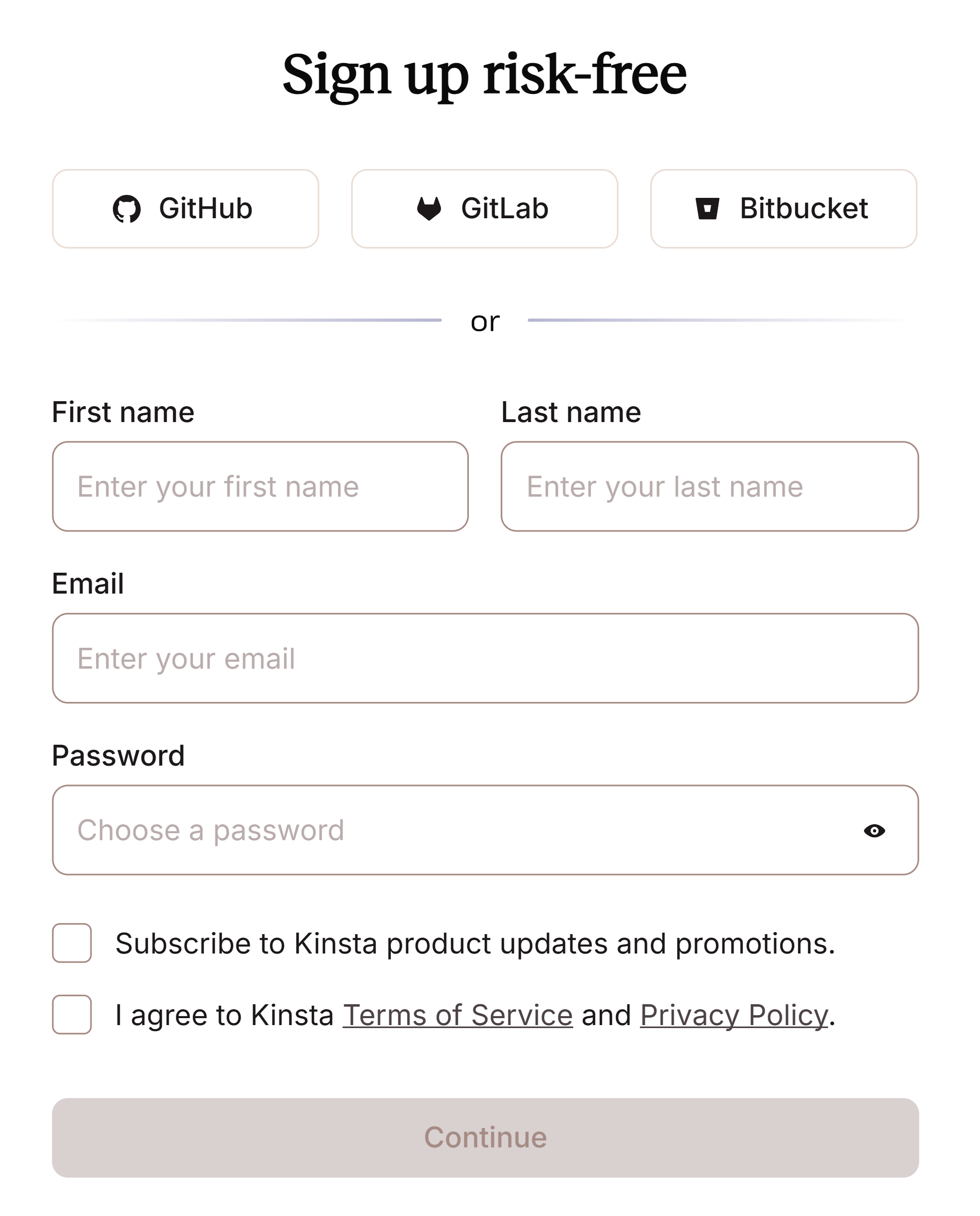
At this stage, enter your name, email, and password to create your account. You can also sign up using GitHub, GitLab, or Bitbucket. The setup is quick and only takes a few seconds. After that, verify your account through your email and continue with your hosting plan.
Step 2: Choosing Kinsta Web Hosting Plan
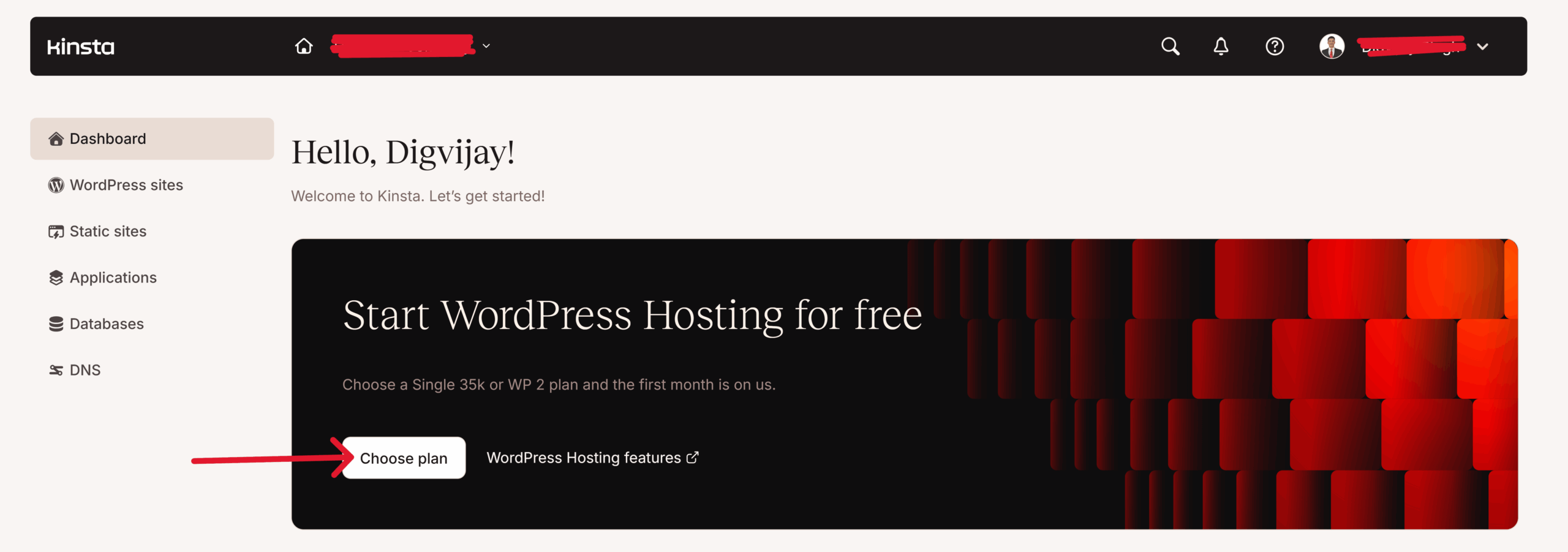
After you create your account, the Kinsta dashboard will open. You can find and click the ‘Choose Plan’ button below. This will take you to the next step of selecting your hosting plan.
To point out our Kinsta review, has examined the pricing and details of all its plans. The best choice depends on your needs. We highlighted which plan works best for different users. For this guide, we chose the Single 35k annual plan. It’s our top recommendation for new bloggers and similar users.
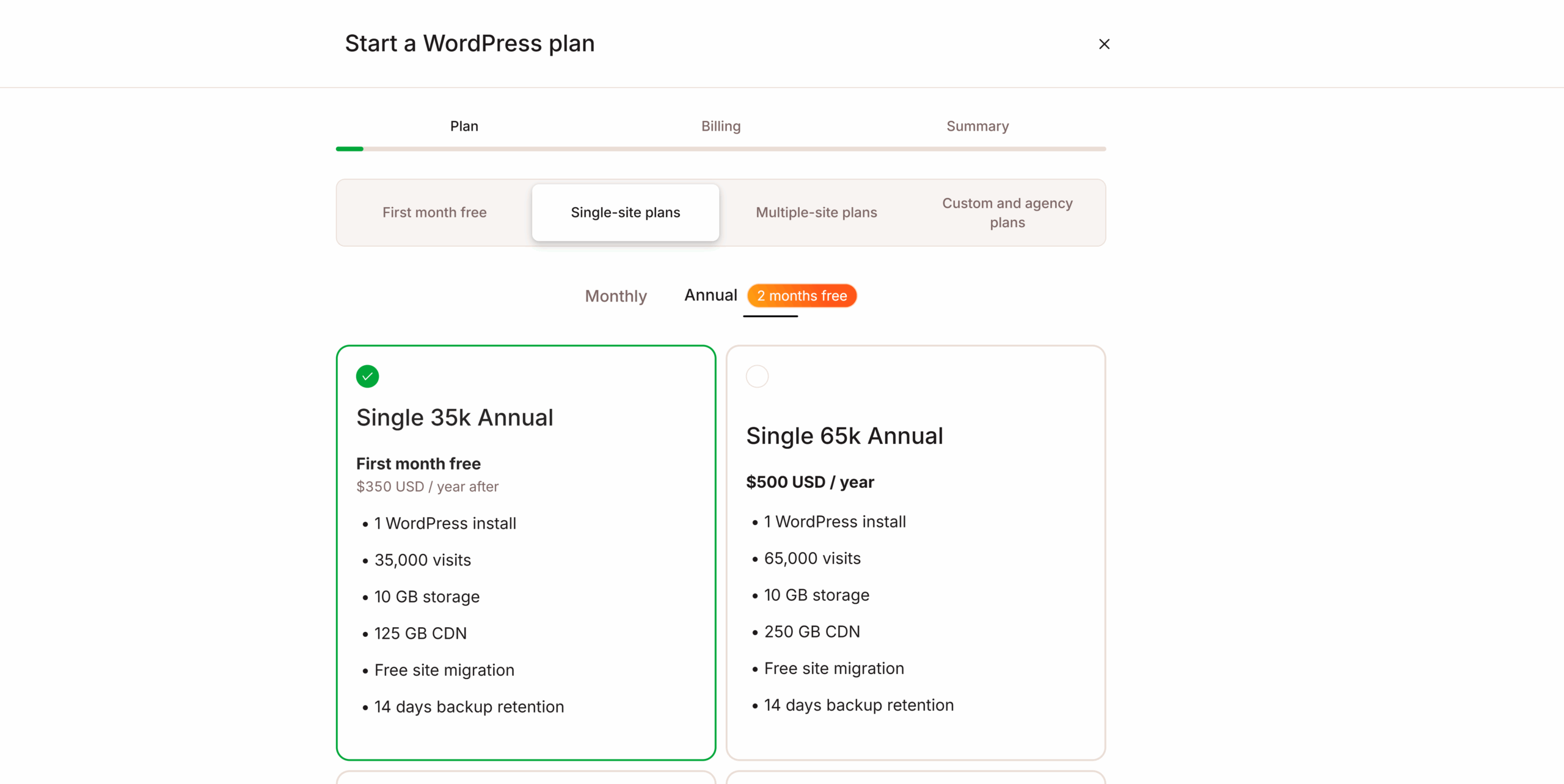
Choose your subscription plan carefully. A monthly plan costs more each month than an annual one. Kinsta offers a free one-month trial. However, if you go for the annual plan, you can get two months free. This makes it a smarter choice for saving money over time.
Step 4: Kinsta Billing
The Single 35K Annual plan costs $350 USD, plus an 18% tax. This makes the total $413 USD for a one-time subscription. You get uninterrupted hosting for a full year. It’s great value and reliable service.
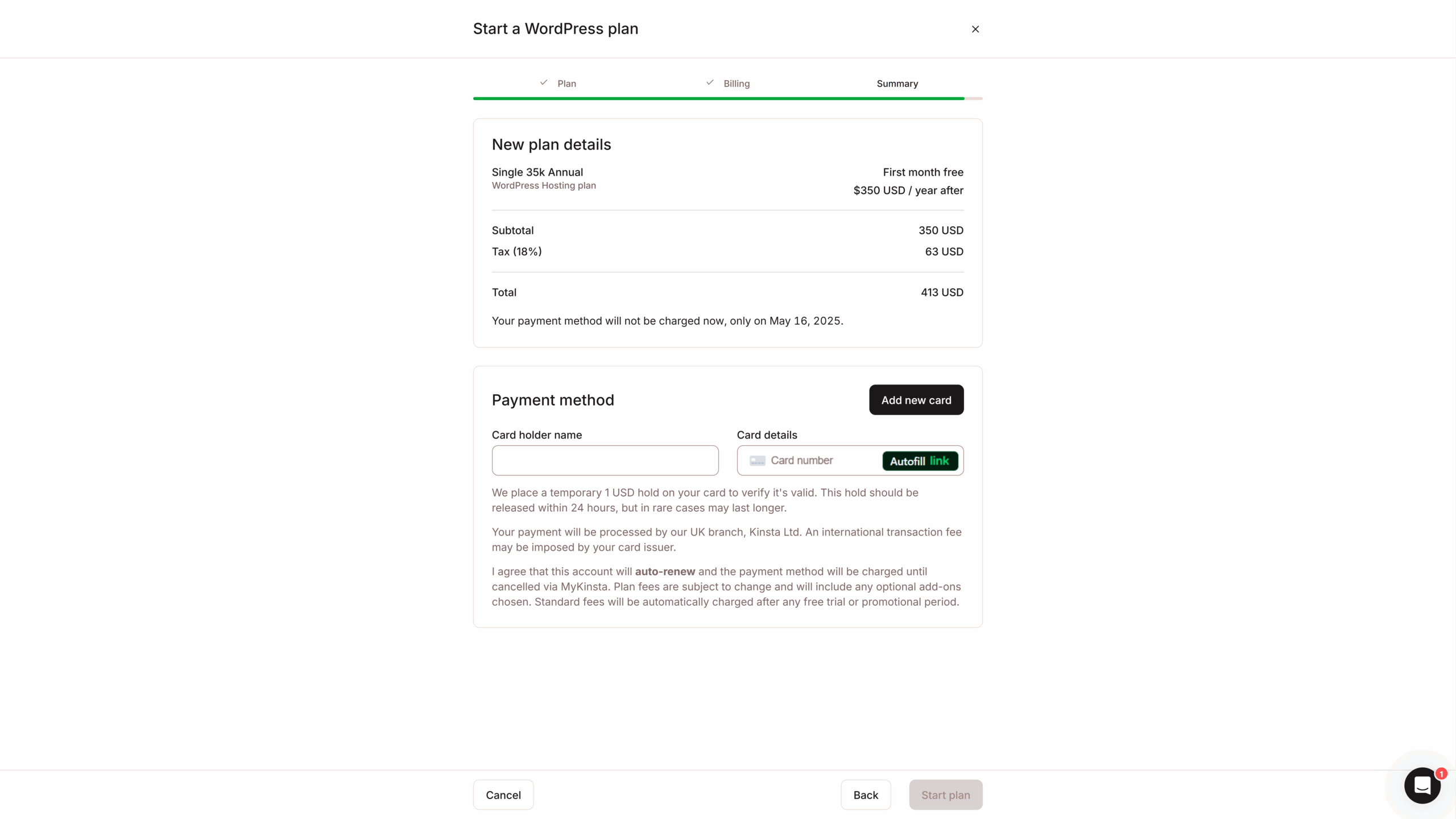
After you pay and fill in the needed details, your plan will start immediately. You’ll receive a bill receipt. Then, you can enjoy Kinsta’s smooth hosting services without any interruptions.
Step 5: Manage your WordPess Website
After activating your Kinsta plan, go back to the main dashboard. Click on ‘WordPress Site.’ Here, you can manage your current website using the migration option. You can also buy a new one to host it easily with your Kinsta plan.
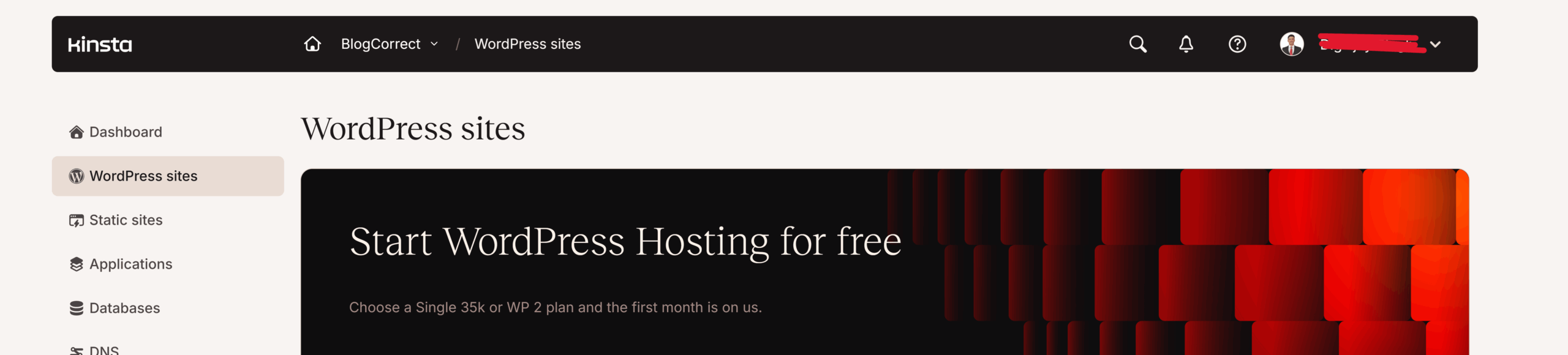
Congratulations! Your Kinsta plan is active, and your website is live. You made a smart choice with Kinsta, a leader in web hosting. They ensure great speed and reliability. Now, sit back and enjoy the smooth performance Kinsta offers for your online journey.
Kinsta Pros and Cons
The pros of Kinsta show why it’s a top hosting provider. It offers free website migration, making the move easier for users. With 37 data centers worldwide, Kinsta ensures broad coverage and accessibility.
The average response time of 210.69 ms. and a guaranteed 99.99% uptime makes it best-in-class. It offers a 14-day backup to keep your data safe. Plus, it has more CDN storage than competitors for faster content delivery. Together, these features make Kinsta an excellent choice for hosting services.
The cons of Kinsta include its heavy pricing. It is much higher than hosts like Hostinger(charges $56 a year) and Bluehost(charges $35 a year).This makes Kinsta almost 10 times more expensive upfront. The real difference is in renewal pricing.
Also, one major issue of Kinsta is that it only supports WordPress as a CMS. This means you can’t install or use other CMS platforms on Kinsta servers. However, it does support applications, static websites, and databases as alternatives.
Final Verdict
Our Kinsta review shows it’s great for single site owners, multiple site owners, and agencies. The Single 35K plan works well for bloggers aiming for a larger audience. Kinsta stands out in uptime% and solid response time. In any case it keeps your site safe and running well.
Kinsta is a top web hosting provider known for its efficiency. However, its pricing can make beginners hesitant. Other platforms, such as Hostinger and Bluehost, have similar features but cost less.
Overall, Kinsta is a great choice for hosting your website. It offers excellent performance, reliability, and security. Some may worry about its cost and pricing. However, the smooth experience and steady services make it worth the investment, especially if budget isn’t a concern.
Kinsta Review: FAQs
What is Kinsta?
Kinsta is a top cloud hosting provider. They focus on managed WordPress hosting, application hosting, database hosting, and free static site hosting. Founded in 2013, Kinsta set out to transform hosting services. Their mission is to build the best global hosting platform. Kinsta uses the Google Cloud Platform. This choice guarantees top performance and a premium hosting experience for today’s WordPress sites.
Is Kinsta free?
No, Kinsta isn’t free. It offers a range of hosting plans, starting at $30 per month. However, certain plans include a free trial period, allowing you to begin for free during the first month
Is Kinsta reliable?
Yes, Kinsta is reliable. It boasts a 99.99% uptime and an average response time of 210.69 ms. This ensures your website stays fast and accessible. Kinsta shines in security too. It offers DDoS protection and malware removal to keep your site safe. Also, their 24/7 expert support has a 98% success rate in resolving issues quickly and effectively.
How to cancel Kinsta?
Canceling your Managed WordPress Hosting plan with Kinsta is simple. Log in to your MyKinsta account, navigate to your username > Company settings > My Plan, and click “Cancel plan.”
Important Points:
- Only the Company Owner can perform cancellations.
- You’ll need to confirm the deletion of all data, including environments and DNS records, as they cannot be recovered.
Refund Details:
- Canceling within the first 30 days makes you eligible for a refund under Kinsta’s Money Back Guarantee, excluding any overages or one-time fees.
- Canceling after the initial 30 days ends your plan at the end of your current billing period, with no renewal.
Finally, you’ll be asked for feedback to help Kinsta enhance its services. The platform values user input to continually improve its hosting experience.
Does Kinsta uses cloudflare?
Yes, Kinsta uses Cloudflare technology to boost the performance and security of its hosting services. This includes managed WordPress hosting, application hosting, database hosting, and static site hosting. Kinsta customers benefit from Cloudflare’s strong features. This includes a secure firewall with DDoS protection. It also has edge caching for faster load times, HTTP/3 support, and wildcard SSLs.
Also, if you have your own Cloudflare plan, you can set up an Orange-to-Orange (O2O) configuration. This setup lets you send web traffic through your Cloudflare zone first. Then, it goes through Kinsta’s Cloudflare zone for more flexibility.
How much Kinsta pays for an affiliate?
Kinsta’s affiliate program offers great payouts:
- Managed WordPress Hosting: You can earn a bonus from $50 to $500 based on the plan your referral chooses. Plus, you’ll receive a 10% recurring monthly commission for the customer’s lifetime. This applies to the monthly fee after discounts, not including add-ons.
- Application Hosting & Database Hosting: You’ll get a 5% recurring commission every month. This is based on the customer’s discounted invoice.
Kinsta’s affiliate program is appealing for developers and hosts because of these benefits.
How to migrate website to Kinsta?
Kinsta provides flexible migration options:
- Self-Migration: You can follow Kinsta’s guides for SFTP, MySQL, Duplicator, or Migrate Guru. Be careful with large or complex sites, as they risk data loss if not migrated properly.
- Kinsta’s Free Migration Service: Let Kinsta’s expert team manage your migration. Request a free migration through your MyKinsta account. If you run multiple WordPress sites, bulk migrations are available.
- Expedited Migration: Need your site up fast? For $49 per site, Kinsta offers expedited migrations, usually done within 8 hours on weekdays. Agency plans might include free expedited migration credits.
Key Tips:
- DNS setup and third-party configurations are not included in the service. This ensures your website has minimal downtime during the move.
- Only Company Owners or Administrators can request migrations.
- Thoroughly test your site on Kinsta before going live.
- Avoid site changes during migration to prevent data loss.
Is Kinsta expensive?
Yes, Kinsta is known for being a pricey hosting provider. Some users believe the high performance and reliability are worth the cost. However, this may not suit every budget.
For Managed WordPress Hosting, Kinsta charges $30 per month if you pay annually. Monthly billing is $35. Web applications start at $7 monthly, and databases begin at $18. Static sites are free. With taxes, an annual subscription for Managed WordPress Hosting can total about $413. This is a big investment compared to budget options.
Is Kinsta worth it?
Kinsta is a top hosting choice. It provides a smooth experience with great uptime and fast response times. This makes it very reliable. Its scalability allows it to handle increasing demands easily. Although it is more expensive, Kinsta delivers value. Users who prioritize performance and reliability are rarely disappointed. Above all, Kinsta is often seen as worth the investment.
Stay tuned with blogcorrect.com for regular blogging insights 🙂
